Build boards for your lessons
Turn a word list into a board with Quick Board Builder, then adapt it with symbols and personal photos.
FOR SCHOOLS, THERAPY PRACTICES & CARE TEAMS
SpeakPad Pro adds goal data, progress reports and faster board building on a pupil’s iPad. Communication itself is free, so no pupil waits for a budget.
Buying SpeakPad Pro for your school or trust ↓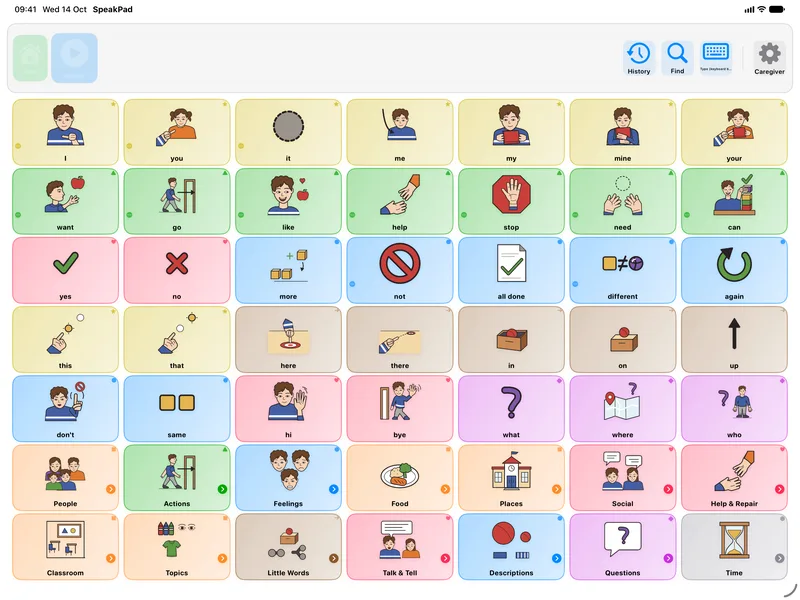
A walkthrough on iPad of the tools school staff use most: talking on the board, building a board for a lesson, Classroom Display, schedules, progress reports, profiles and device management.
Everything a pupil needs to communicate is free: unlimited speech, sentence building, prediction and every accessibility feature, with no time limit and no ads. Your team can try SpeakPad with real pupils before anyone asks for a budget, with no quote or sales call. Pupils never need a licence to communicate; a Pro licence on a pupil’s iPad adds the tools staff use to support them.

Turn a word list into a board with Quick Board Builder, then adapt it with symbols and personal photos.
Record EHCP, statement and therapy goals with prompt levels on the pupil’s iPad, print data sheets, and see progress over time.
Export formatted PDF activity reports, with goals, target words and notes, for reviews with staff and families.
See a sample Usage Report (PDF)
Goals, team sharing and drawing require SpeakPad 3.0.1 or later.
All four are free; only the formatted PDF report needs Pro.
Connect the iPad to a TV or projector by AirPlay or a cable, and the screen shows the board and the message full size, without the caregiver buttons. Each word lights up as it is tapped, so the class sees where it is while you model. Turn it on in Settings → Boards & Vocabulary → Classroom Display.
Turn a board into a schedule with large First and Then cards, a Finish Step button and a countdown timer for the current step. It starts fresh each morning, and a pupil using a switch can reach every step.
An optional bell next to Speak plays a chime, then says "Excuse me!" or a phrase you choose, so a pupil can call an adult over in a noisy room.
List the words a pupil is working on and see how often each was used, not counting taps made while an adult was modelling. Add dated notes, and both print in the PDF activity report for EHCP and therapy reviews.
PLAN YOUR SCHOOL’S ROLLOUT
SpeakPad Pro Edition is the same app with every Pro tool included, bought once for each iPad with nothing to renew. On that iPad, staff get every built-in symbol and Quick Board Builder for building boards, as many communicator profiles as they need, SpeakPad's natural voices, goals with data sessions, PDF reports and team sharing. It runs on every iPad that SpeakPad supports, including those that can’t update to iPadOS 27. Schools buy it in Apple School Manager, where Apple’s education discount on 20 or more copies applies, and assign it to pupil iPads like any other app; no Apple Account is needed on the iPad. It also suits charities, grants and funding plans that need an Apple invoice for an app rather than a subscription. The price for your country is shown in the App Store.
Device suppliers and assistive technology services buy SpeakPad Pro Edition in Apple Business and assign it to the device: no Apple Account on the iPad, nothing to renew, and nothing that funding rules that exclude subscription apps would reject. On a prescribed iPad, Pro Edition adds SpeakPad's natural voices, every built-in symbol, goal tracking with data sessions and PDF reports for reviews. The free app has everything a person needs to communicate, with no time limit, so a prescriber can trial it on any iPad before a device is ordered.
School volume subscriptions are not available yet. Apple has announced that Volume Purchasing launches on 22 October 2026. Contact us to discuss your rollout and confirm SpeakPad availability. Read Apple’s announcement
The planned annual school subscription is for each pupil iPad that uses Pro, at the Pro Annual price for your country, shown in the App Store. Pupils who only communicate need no licence, and staff need none of their own. Apple has announced Volume Purchasing through Apple School Manager and Apple Business for 22 October 2026, and its school subscriptions need iPadOS 27 or later on the pupil iPad. SpeakPad availability depends on purchase-channel setup and successful verification; that date does not guarantee activation. For older iPads, or to buy now, use SpeakPad Pro Edition above.
Free professional codes are for registered therapists’ own devices, not for school-owned iPads. Staff don’t need a licence of their own: boards are built on the pupil’s iPad, or built elsewhere and shared as .speakpad files, which import free.
One licence for each iPad on which a pupil uses Pro: goal data, PDF reports, SpeakPad voices, symbols beyond the free allowance, or more than two profiles. Pupils who only communicate don’t need one. We still need to verify how Apple assigns licences on managed iPads and will confirm the count with you before you buy.
Tell us your country, your number of iPads, whether pupils share them, and your intended start date. No pupil details are needed.
Several pupils can use one iPad, each with their own boards, voice, settings and usage data. Two profiles are free; Pro lets staff create more. Staff switch profiles behind the caregiver gate. These are profiles within SpeakPad, separate from Apple’s Shared iPad accounts.
A pupil’s words belong to them. Export their profile as a .speakpad file and it can be restored on a family iPad or at their next school, with every board, photo and setting intact. Exporting is free and needs no licence.
Pupils don’t need accounts, and there’s nothing to sign up for. SpeakPad does not collect, sell, or share personal data. Boards, photos and usage data are stored on the iPad. When the iPad is signed in to iCloud, SpeakPad also backs them up automatically to that iCloud account, which we cannot access. Your IT team can turn iCloud off on every iPad. Privacy Policy
If your school, trust or local authority needs a data protection agreement signed, a DPIA supported or a security questionnaire completed, email support@speakpadapp.com and we’ll complete it.
Read our data protection, security and accessibility answers for UK schools
These guides help staff set SpeakPad up and use it well from day one.
Try free communication with your pupils, then talk to us about the Pro tools and purchasing options your team needs.
support@speakpadapp.com