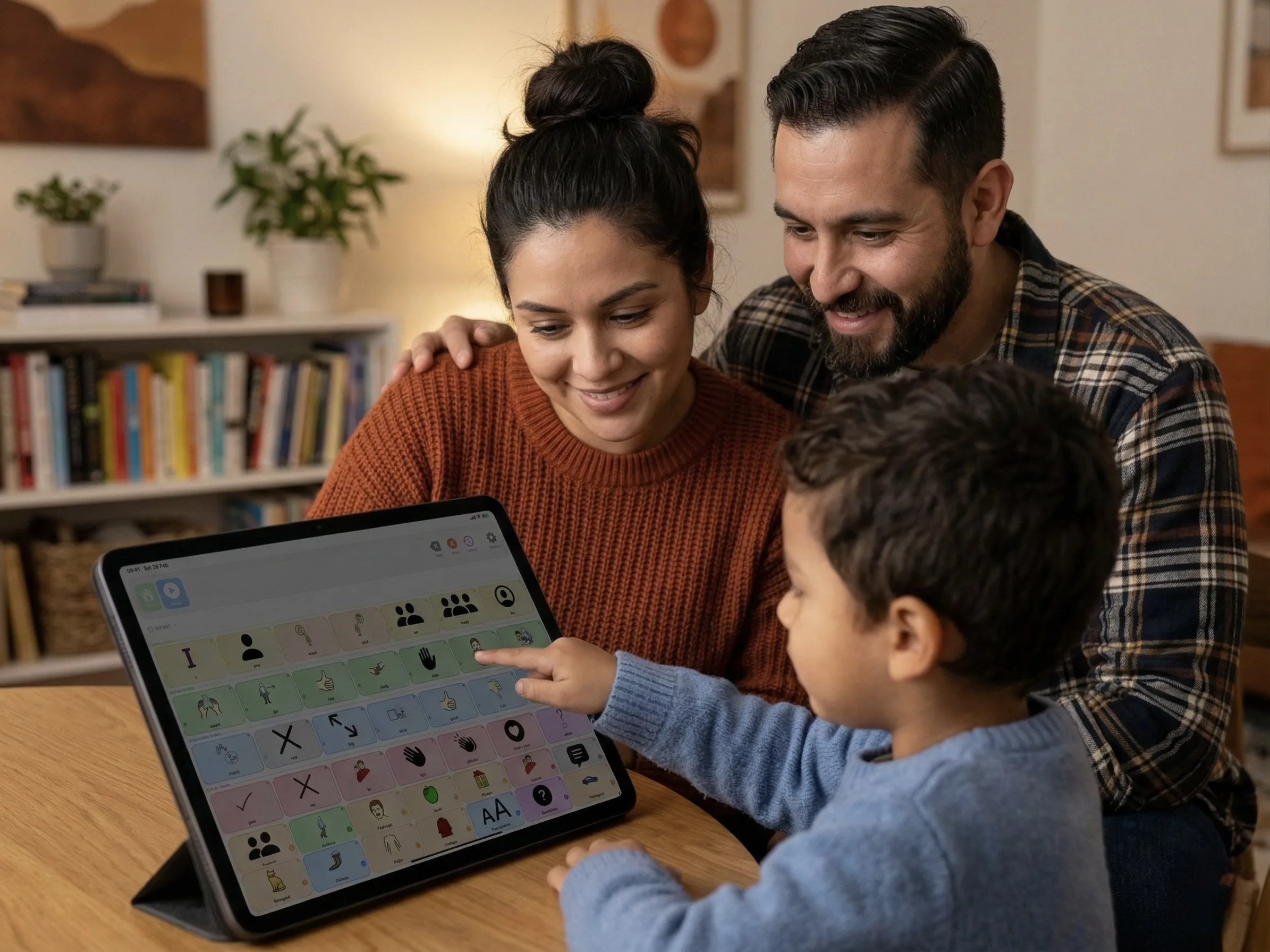

Help your child be understood.
SpeakPad helps children communicate with pictures on iPhone and iPad. Tap a symbol to speak, or build a whole sentence.
Speaking is always free. Less guessing, less frustration, and boards that are easy for you to change as your child grows. Compare Free and ProSee SpeakPad in Action
See it in 30 seconds
Watch a sentence come together one tap at a time, then hear SpeakPad say it. Turn the sound on.
At a Glance
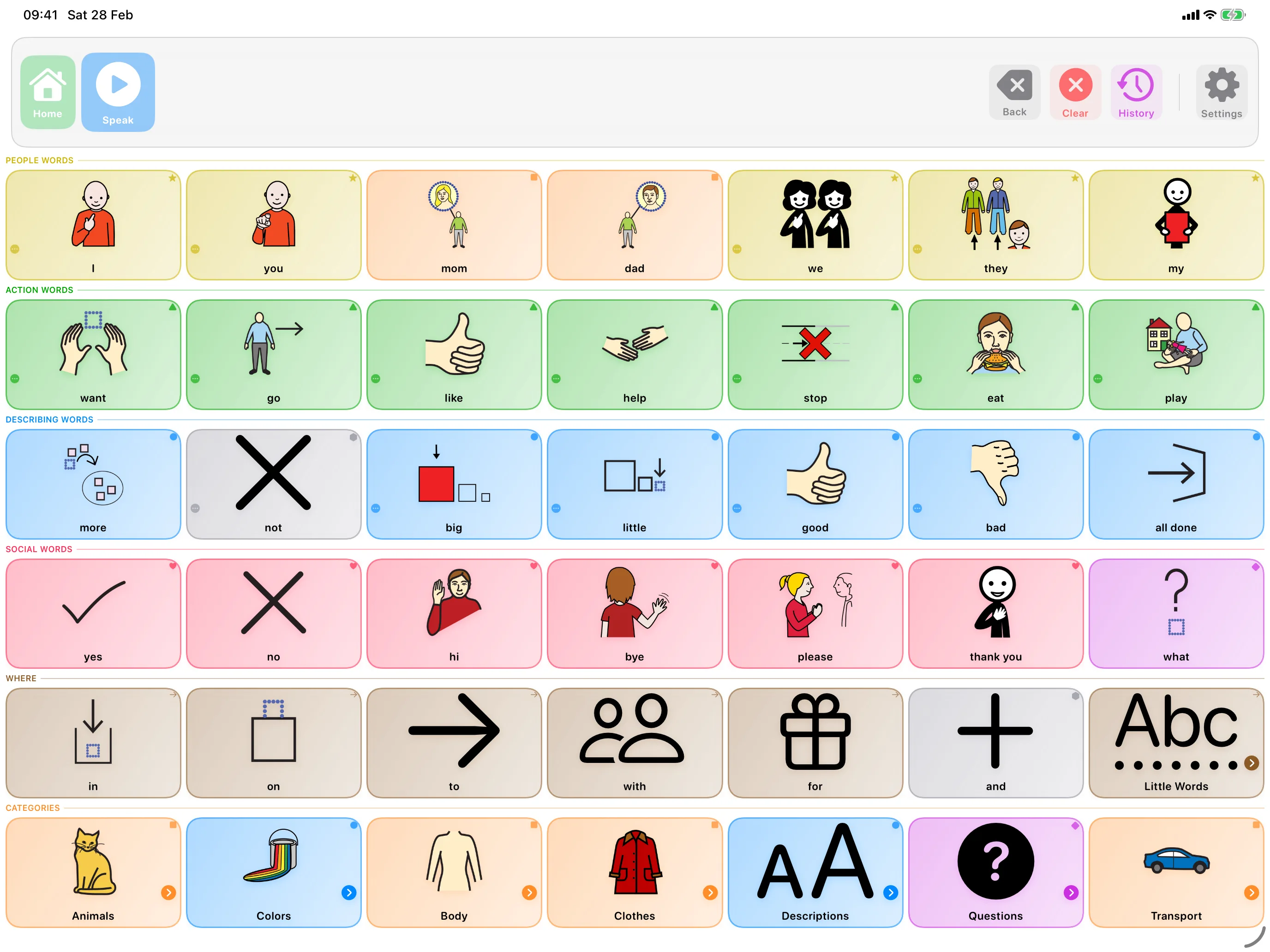
Words are color-coded by type with the Fitzgerald Key, nouns one color, verbs another. Once a child clocks the pattern, they spot the word they want faster.
Sentence Building
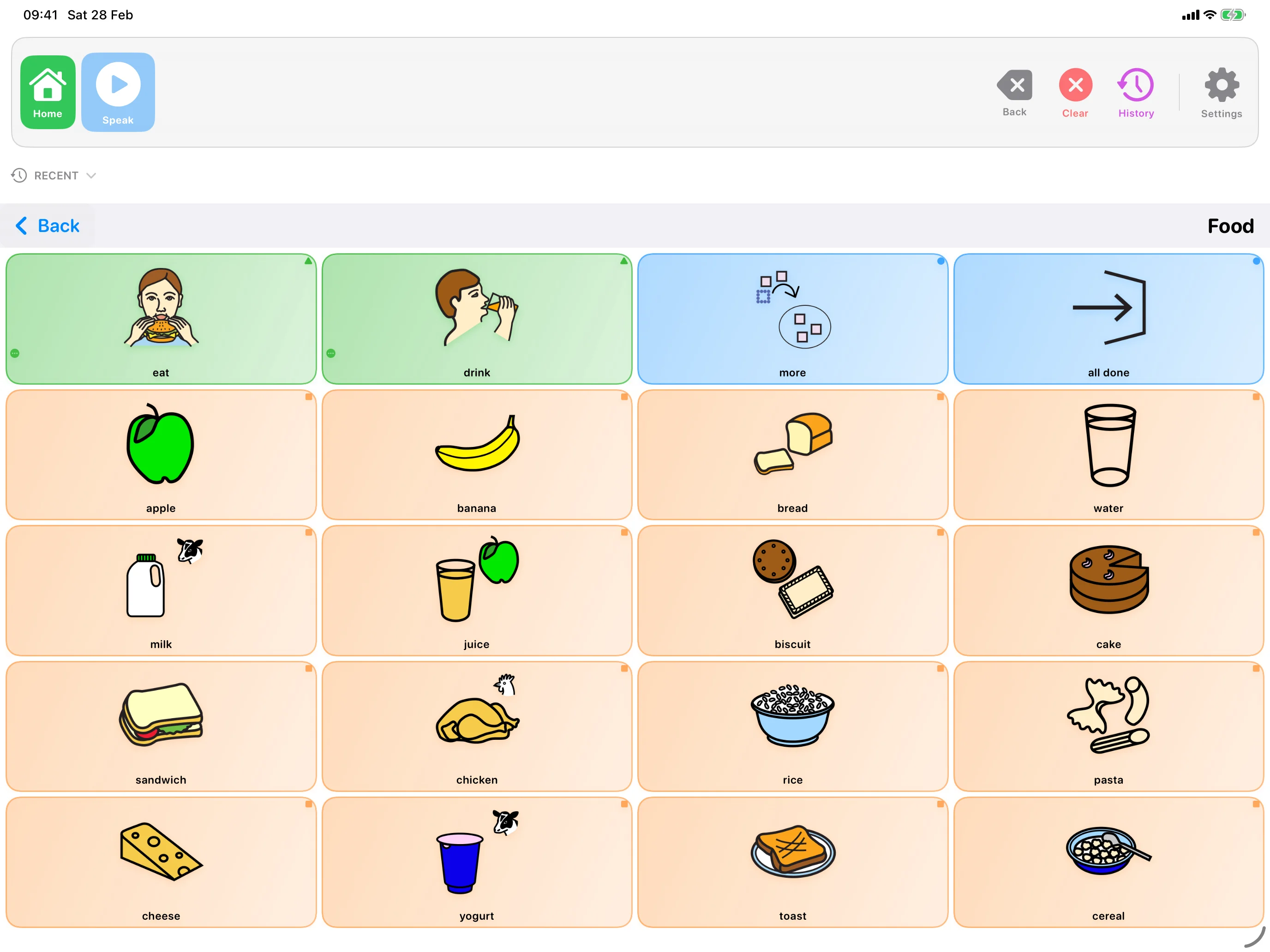
Each tap drops a word into the message bar at the top. Over time, single words become "I want more" becomes a whole sentence.
Your Own Photos
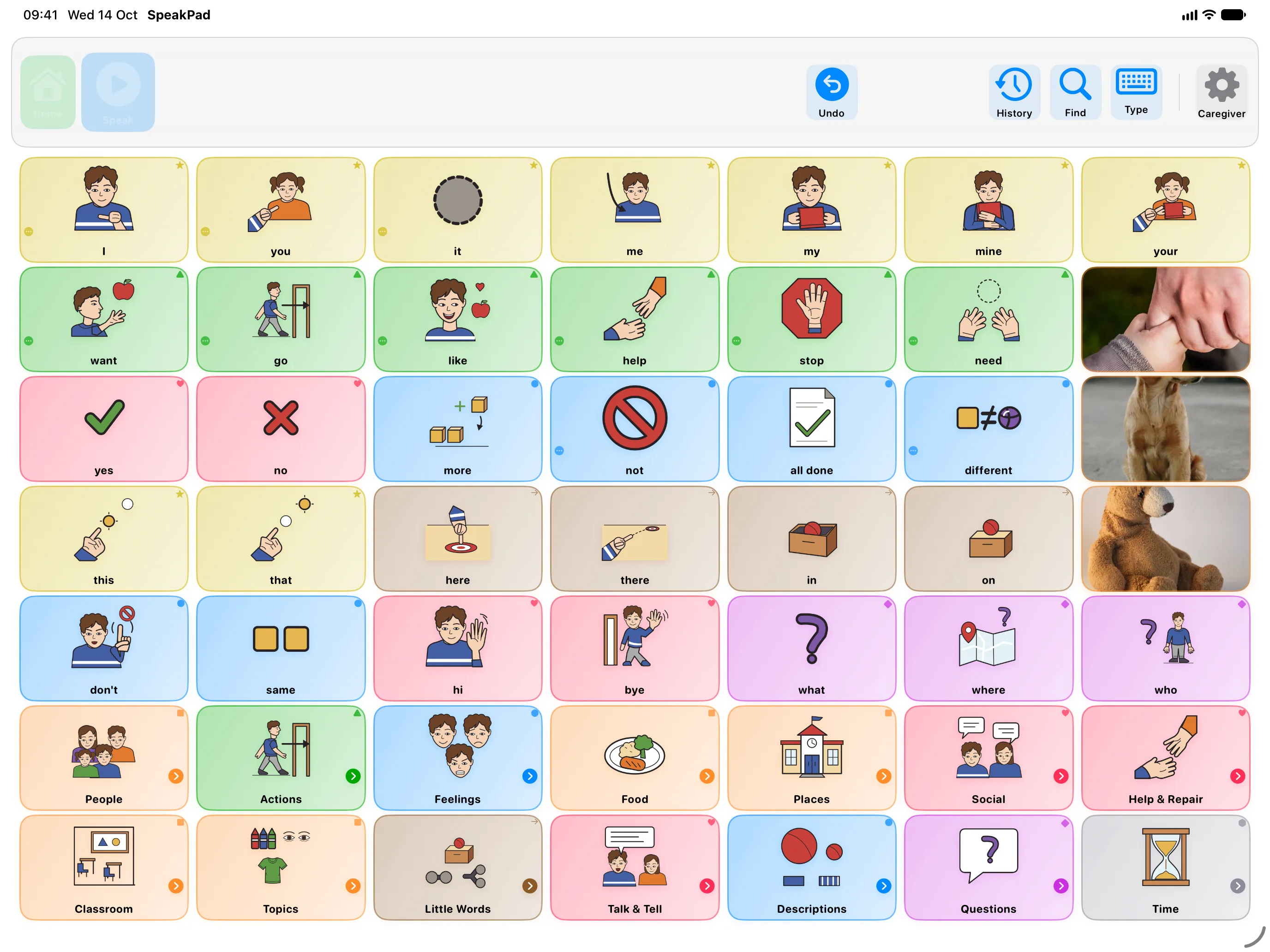
A word can carry a photo from your camera roll instead of a symbol: a parent, the family dog, a favorite toy. A child recognizes their own dog long before they recognize a drawing of one.
Caregiver Controls
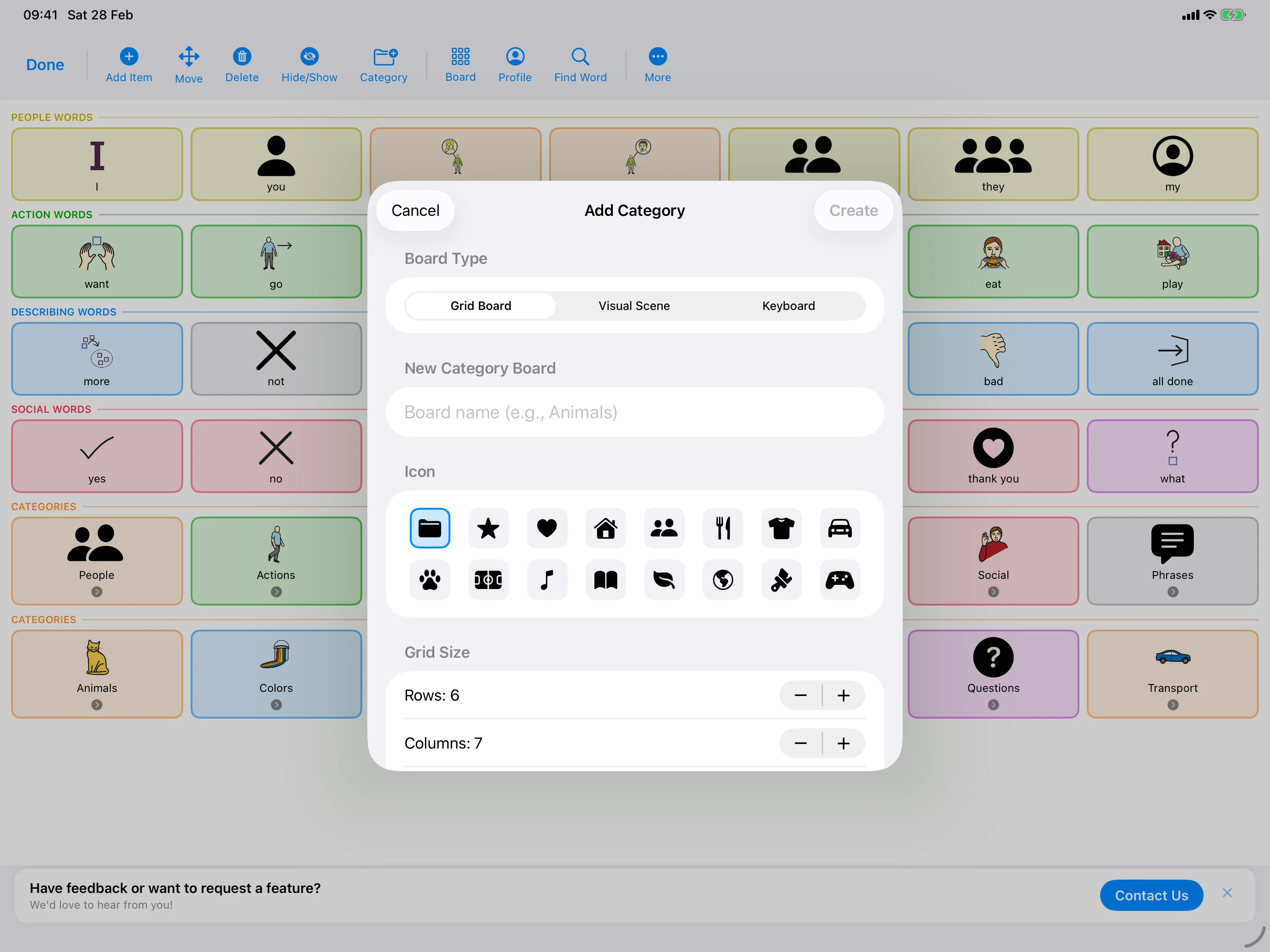
Everything you'd want to change sits behind the parental gate: grid size, vocabulary, folders, profiles. The child never stumbles into it mid-sentence.
What the colors mean
- Action
- Thing
- Describing
- Social
- Question
- Person
- Where
- Other
Made for everyday communication
Tap to Speak
Tap a symbol, hear the word. String a few together and the device speaks the whole sentence in its own built-in voice.
Fully Customizable
Add your own words, drop in real photos, and fix how a tricky name is said. The Core Zone keeps the words your child uses most on every board, never more than a tap away.
Same Boards on Both Your Devices
With Pro, keep boards updated across your iPhone and iPad signed in to the same iCloud account.
Private & Offline
Core communication works offline. No ads, no SpeakPad account, and no communication data sent to us.
Kid Safe
Purchases and settings stay behind a parental gate, away from your child’s communication board.
Designed for Caregivers
Make the boards feel like home with your own words and photos. Editing, personal photos and two communicator profiles are free.
Caregiver tools sit behind a parental gate. Your child gets a calm board with familiar words in familiar places.
Get started with SpeakPad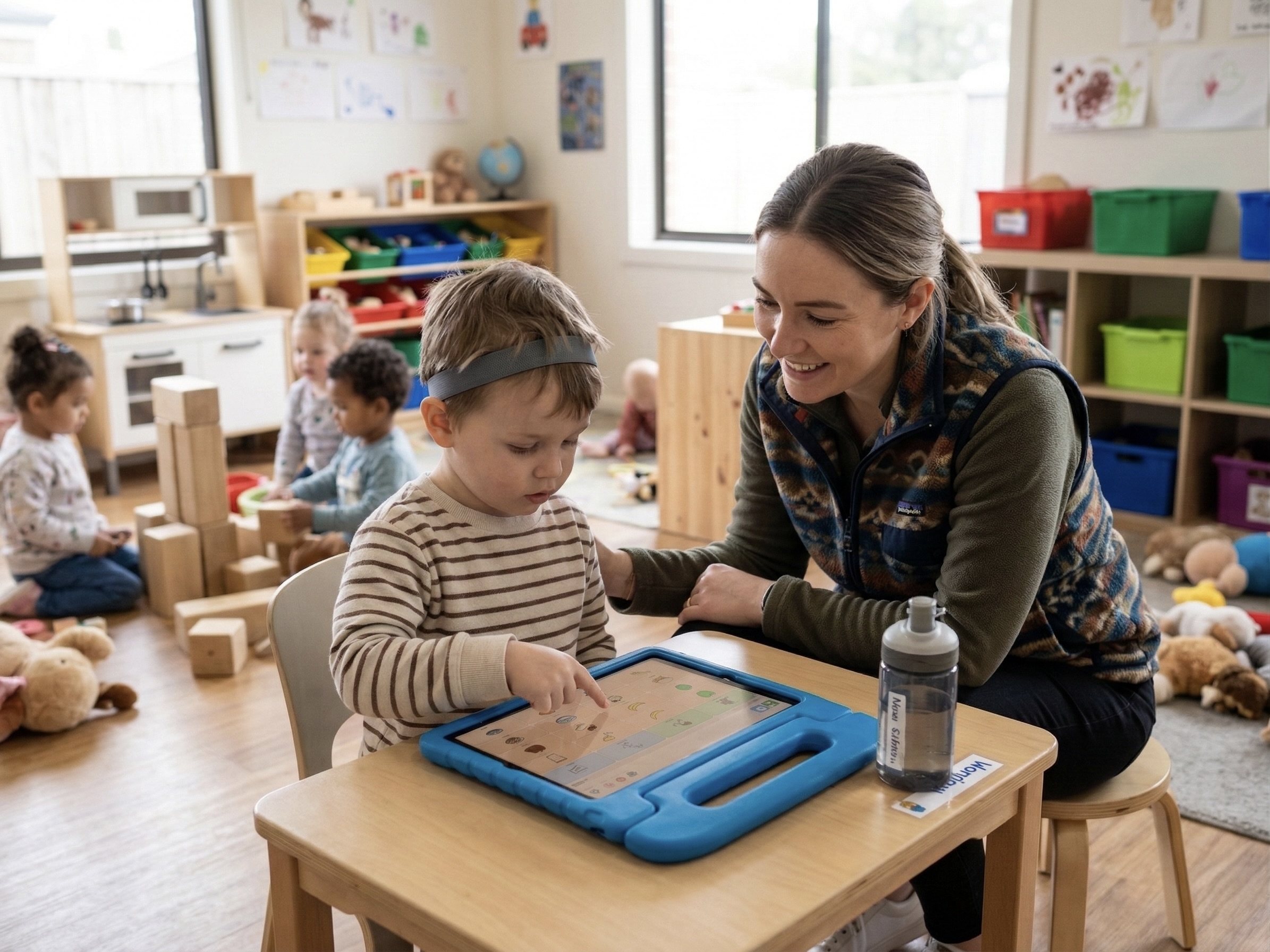
More Features Bilingual support, word prediction, board imports, and more
Smart Language Tools
Language doesn't stand still, and plenty of homes don't run in a single language either. These tools are here for both.
Bilingual Support
If your home runs in two languages, so can SpeakPad. Show both labels on every symbol, and choose whether one or both get spoken aloud.
Grammar & Popups
Press and hold a word to reach its other forms: 'go' opens up 'going', 'went', 'gone'. Hundreds of words carry their forms with them, including full verb conjugations in Spanish, French, and Portuguese.
4 Complete Vocabulary Sets, 10 Topic Boards
Start with a complete set, from Early Communicator to Teen Social, then add topic boards like Mealtime or Emotions when you need them. Topics slot in beside your child's words without moving any of them. That's about 9,000 buttons across 413 boards to begin with, in all nine languages, and you can edit every one.
Word Prediction
For children who are starting to read, likely next words light up right on the grid. There's also a full keyboard in the message bar, with prediction that runs on the device and never phones home.
Recent Words
A row that quietly holds the last seven words your child tapped, ready to reuse.
Works with Other AAC Apps
Already built boards in CoughDrop or CBoard? Bring them across. SpeakPad opens Open Board archives (.obz), and with Pro it exports your boards back out, so a therapist or school can use them in the tool they already have.
Personal Voice
If you've recorded a Personal Voice on your iPhone or iPad, SpeakPad can speak with it. A child can be heard in a parent's voice, or their own, and it never leaves the device.
Vocabulary Stages
Start with just first words, then open up the rest as your child grows: three stages, from requests and people to the full board. Buttons never move between stages, so nothing they've learned is lost.
Draw What You Mean
When there is no symbol for what you mean, draw it. The free drawing pad gives children and their communication partners another way to explain. A caregiver can turn a drawing into a word on the board.
High-Quality Symbols
SpeakPad has over 26,000 symbols. New profiles start with SpeakPad’s own symbols, drawn for this app, and any word without one yet keeps a classic AAC symbol. They read clearly at a glance rather than just looking nice.
Preview the app in your language
SpeakPad runs on both. With Pro, whatever you set up on one device appears on the other through the same iCloud account, so your child's words go wherever they do.
iPhone suits a smaller grid where every tile has room to breathe. For children still developing fine motor control, fewer tiles mean bigger targets. When they're ready for more vocabulary, iPad fits a denser board.
For Speech Therapists & Clinical Users Show advanced tools and clinical features
Advanced Clinical Toolkit
The basics cover most days. But SpeakPad also includes the heavier accessibility tools usually locked inside AAC apps that cost a small fortune.
Visual Scene Displays
Use a real photo, your kitchen or the park or their bedroom, and draw invisible tap zones over the things in it. Touch the kettle, hear 'tea'. A first step for children not yet ready for a grid of symbols.
In-App Switch Scanning
SpeakPad scans by row and column, cell by cell, or in groups, at an adjustable speed. Use the on-screen switch or a compatible keyboard-style or game-controller switch. Check the switch guide for supported inputs and setup.
Usage Analytics & Reports
SpeakPad quietly tracks which words get used and how often, on the device, and never sends it to us. When an IEP meeting or therapy review comes round, export the data as CSV or JSON, or as a formatted PDF report with Pro.
Message History
Look back over what's been said, tap an old message to speak it again, and see which phrases come up day after day.
Profile Management
One iPad, several children, a separate profile for each, which is why plenty of therapists and schools run SpeakPad on shared devices.
Printable Boards
Turn any board into a clean PDF, with crisp symbols, the same Fitzgerald Key colors, and your choice of layout. Handy for the car, the bath, or anywhere a screen won't go.
Goals & Data Sessions
With Pro, write communication goals, measure them during sessions and review prompt levels and progress. Print data sheets or include progress in the PDF report. Everyday target-word counts and session notes stay free.
Share With the Team
Invite a therapist, teacher or family member on their own Apple Account. Pro lets you start sharing and publish changes; receiving boards and applying offered updates is free. Each device keeps its own settings and usage history.
For Professionals & Therapists
SLTs and pathologists build on evidence, and so did we. Three principles shaped SpeakPad's design, and we wouldn't compromise on any of them:
- Strict Motor Planning: Buttons keep their grid positions as vocabulary grows. Revealing a vocabulary stage, showing a hidden word, or adding a topic board never moves an existing button.
- Vocabulary Masking: Hide advanced vocabulary without altering the board layout. A three-stage setting (First Words, Growing, Everything) reveals starter vocabulary progressively, and any individual button can still be masked by hand.
- Fitzgerald Key Compliance: Core vocabulary color-coding is built-in by default to aid in rapid visual scanning.
It's a sturdy thing to send home with parents for daily practice between sessions.
A free year of Pro for therapists. If you are a speech and language therapist or pathologist, ask us for a code that gives you twelve months of SpeakPad Pro on your own iPhone or iPad. Email us from your professional address with your name, role, workplace and registration. You redeem the code in the app: in Caregiver Mode, open Settings, tap See SpeakPad Pro and choose Redeem a Code. After the free year, Pro renews at the annual price unless you cancel. Request a free year of Pro
Full accessibility is built in: VoiceOver labels on every element, in-app switch scanning (row-column, linear, and group), Dynamic Type support, and configurable touch accommodations (hold duration, repeat filtering). Compatible with iOS head tracking and AssistiveTouch. Requires iOS / iPadOS 17+.
Speaking is always free.
Start communicating with SpeakPad Free. Optional Pro tools save the time it takes to build and keep up their boards.
Goals, team sharing and drawing require SpeakPad 3.0.1 or later.
Schools, clinics and funders buy SpeakPad Pro Edition once per iPad. SpeakPad for Schools and Organizations
SpeakPad Free
A complete way to communicate, with no time limit.
- Unlimited speech, sentence building, prediction, drawing and every accessibility feature
- One complete vocabulary set and every topic board, plus one free change of set per profile
- Unlimited text and personal photo vocabulary; create and edit boards freely
- Search the symbols available for your profile’s symbol set, reuse symbols already on its boards, and assign 30 new ones free; on the SpeakPad set, search covers all 26,000+
- Two communicator profiles
- Board imports, .speakpad sharing, printing, file backups and automatic iCloud backups
SpeakPad Pro
Everything in Free, plus SpeakPad's natural voices and the caregiver tools below.
- Download SpeakPad's natural-sounding voices for English and Irish; every voice built into SpeakPad stays free
- Assign any built-in symbol, beyond the 30 free assignments on each profile
- Create a whole board from a word list with Quick Board Builder
- Switch vocabulary sets as often as you need
- Apply newer boards from your other devices on the same iCloud account automatically
- Create a third communicator profile and beyond
- Export formatted activity reports as PDFs
- Track IEP or therapy goals session by session, with prompt levels and progress in the PDF report
- Share boards, goals and sessions with invited team members on different Apple Accounts; receiving their updates is free
- Export .obz boards for other compatible AAC apps
Common Questions
Answers for families new to AAC.
What is AAC?
AAC, Augmentative and Alternative Communication, is any tool that helps someone communicate when speech is hard.
My child doesn't speak at all. Will AAC delay their speech even further?
A large body of research, summarized by ASHA, finds the opposite: AAC supports the development of spoken language rather than replacing it. Giving your child a reliable way to communicate reduces frustration and often leads to more speech attempts over time, not fewer.
Is SpeakPad free?
Yes. Downloading, speaking and every accessibility feature are free, with no time limit or ads. SpeakPad Pro is an optional purchase for additional caregiver tools, available only behind the parental gate.
What age is SpeakPad for?
There's no minimum age and no prerequisites. SpeakPad suits toddlers through to teens and adult AAC users. Starting sets range from Early Communicator, with fewer and larger buttons, to School Ready and Teen Social for older users, and a keyboard with word prediction is there for anyone who can spell.
What if I don't know anything about AAC?
SpeakPad is designed to be simple. When you first open the app, a short setup walks you through choosing a language, picking a starting vocabulary set, adding your child's name, and choosing a voice. After that, a ready-made communication board with common vocabulary is set up and ready to use immediately. Get started with SpeakPad
What languages does SpeakPad support?
SpeakPad supports 9 languages: English, Spanish, French, Arabic, Portuguese, Hindi, Simplified Chinese, Dutch, and Irish. Board labels, starter boards, speech, and the app interface are available in every one of them. Apple has no Irish voice, so SpeakPad speaks Irish with two voices of its own, built into the app. You can also enable bilingual mode to show labels in two languages at once.
Is my child's data private?
Completely. SpeakPad has no accounts, no ads, and no third-party analytics or tracking. It connects to a SpeakPad server only to download a SpeakPad voice a caregiver chooses, and sends no personal data when it does. Boards, photos, and the usage data behind SpeakPad's own reports stay on your device. Backups go to your own iCloud, which only you can see.
Can a speech therapist or teacher use SpeakPad with my child?
Yes. Two profiles are free and Pro adds more. Any board can be shared as a .speakpad file, and importing boards is free. The usage dashboard, CSV/JSON exports and board printing are free. Formatted PDF reports for IEP or therapy meetings, and .obz export for other AAC apps, need Pro.